
In this article, we will discuss manual and advanced methods, their limitations and advantages and conclude with an efficient method to perform safe conversion.
Why MBOX File Conversion is Important?
MBOX files are widely used, but they are not always compatible with all email clients. Some of the main reasons for conversion include -
· When a user wants to shift from one email client to another, it requires compatible formats like PST, EML and MSG.
· It helps create a backup and makes the files easily shareable and it is useful for organizations and business users.
· Not all email clients support the MBOX format and converting MBOX files into other formats ensures the email files can be opened and read on any email client.
Manual Method for MBOX File Conversion
For users who want a free approach, manual methods are available. Although these methods are free, they require advanced technical knowledge and are suitable for only expert users. They cannot be performed easily because they involve multiple steps and needs high attention while performing the conversion.
Manual Method 1 - Using Thunderbird to Export Files
· To do the conversion, you need to install Mozilla Thunderbird on your device.
· After that, use the ImportExportTools NG add-on to bring the MBOX file into Thunderbird.
· Choose the folders or emails you want to change.
· Click the right mouse button, choose Export, and then pick the format you want from the list.
· Check the files after the process is done to make sure the data was sent correctly.
Manual Method 2 - Converting to PST Using Outlook
· Use Thunderbird to export the MBOX emails to EML files first.
· Put the EML files into Microsoft Outlook by dragging and dropping them.
· Click on File, then Open & Export, and then Import/Export.
· Choose PST format and then Export to a file.
· Pick the folder where you want to save the file.
After the process is done, look at the exported PST file to make sure that all of the emails were moved over correctly.
Limitations of Manual MBOX Conversion -
Hands-on approaches have a lot of drawbacks, even though they are free.
· It takes a long time and a lot of steps to change files by hand. This is especially true for emails with a lot of attachments.
· These steps aren't easy to follow, and they don't always work on all machines, so they're not appropriate for beginners.
· You could lose records, email attachments, and the way the files are laid up if you edit them by hand.
· It's hard to quickly edit and transfer more than one MBOX file because it doesn't have a facility for converting groups.
· Doing things by hand makes it more likely that you will make mistakes since you require more aid from other people.
This is why people and enterprises that have a lot of files shouldn't handle things by hand.
Advanced Method for Secure MBOX Conversion
Because of multiple limitations of manual methods, many users switch to a professional conversion tool, which is WholeClear MBOX Converter. It is designed for converting MBOX files into other formats like PST, EMLX, MSG, HTML and more. This tool offers high-quality performance and comes with advanced features. It can store emails for the long term and can provide great management of files. This converter seamlessly converts data and preserves all the important details such as attachments, data, formatting, hyperlinks etc. This software comes with an easy and self-explanatory interface that does not require technical expertise. It can convert bulk emails in just a few minutes with its bulk conversion feature. This tool is capable of handling large email files without any difficulty.
Follow these steps to convert email files securely -
1. First of all, install the conversion tool on your system.
2. Then, select the MBOX file format and choose File and Folder mode to upload the MBOX files.
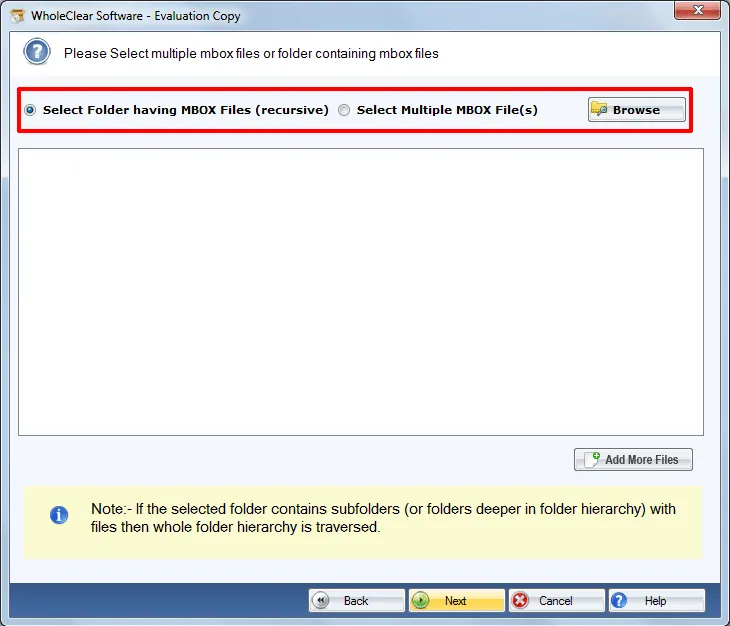
3. After uploading the files, select any format from the available options in which you want to convert the emails.
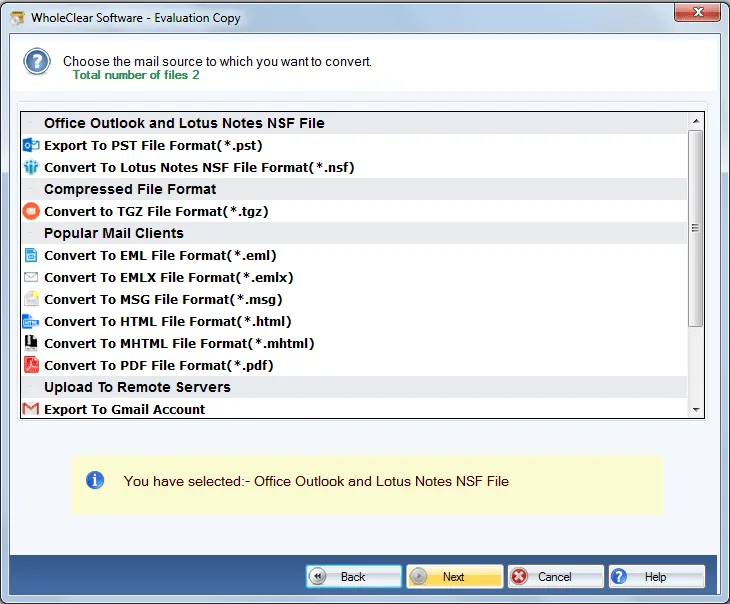
4. Choose the folder on your computer where you want to save the converted file.
5. Click on the Convert Now button to begin the process.
Advantages of Using a Professional MBOX Conversion Tool
Using this professional tool can provide a secure MBOX file conversion and offers several advantages over manual methods -
Tips for Fast and Secure MBOX File Conversion
Follow these easy tips to perform smooth and effective conversions -
Conclusion
For anyone handling several email clients and managing multiple email clients, converting MBOX files is necessary for them. Although manual methods provide a free solution, they are inefficient for converting large datasets and take a lot of time. While professional tools provide advanced functions like batch processing, multiple format compatibility and data security. This tool is useful for quick, safe, and secure MBOX file conversion.
Users who need efficient and secure conversions can use a professional tool. By following the provided tips and techniques in this guide, you can perform the conversions smoothly without losing data.

